Inviting colleagues
Send another teacher an invite. You both get a little more AI room.
If a colleague would get something out of InteGrade, you can invite them from your settings. It is a plain invitation: they get their own free account, and nothing of yours is shared with them. When they join, you both get some extra AI room for a couple of months.
Sending an invite
- Open your settings and find Invite colleagues.
- Type their email address and send.
- The invite appears in your list as Pending. When they sign up, it turns to Joined.
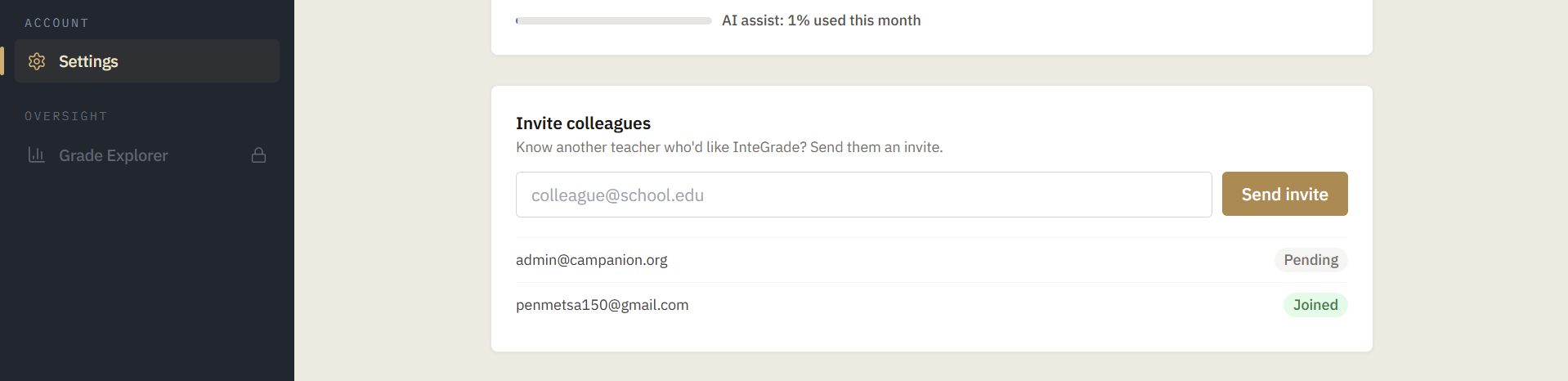
They receive a short email saying you invited them, with a button to sign up. Set a display name in your settings first if you have not, because without one the invite arrives from "A colleague", which is a worse pitch than your name.
What you both get
When someone you invited signs up, you and they each get extra AI assist headroom for the next sixty days. You will not see it announced anywhere: it shows up as more room in your usage percentage, the same way the rest of the allowance works. See AI assist and its limits.
Why it still says Pending
The match is made on the email address, exactly as you typed it, at the moment they sign up. It is not retroactive. So an invite stays Pending forever if:
- They signed up with a different address. A personal address instead of the work one, or the other way round.
- They already had an InteGrade account. There is no signup to match against, so nothing happens.
If a colleague joined and their invite still says Pending, one of those two is almost always why.
Fine print worth knowing
- You can invite as many people as you like. There is no limit.
- Re-sending to the same pending address just sends the email again.
- You cannot invite yourself, and you cannot invite someone who already joined; InteGrade tells you so either way.