Sharing graded work with students
Each student gets a link to their own graded pages. No accounts, no PDFs to email.
When you have finished grading, each student can get a link to their own work: the marked-up pages, the rubric items you applied, your comments, and their score. The link opens straight to their feedback: no account, no login, nothing to install.
Before you can share
The assignment has to be published first. If sharing is unavailable, finish the rubric and publish, then come back.
Sharing with one student
From the assignment, create a share link for a student. Before the link exists you choose two things: how long it should last, and whether InteGrade emails it for you.
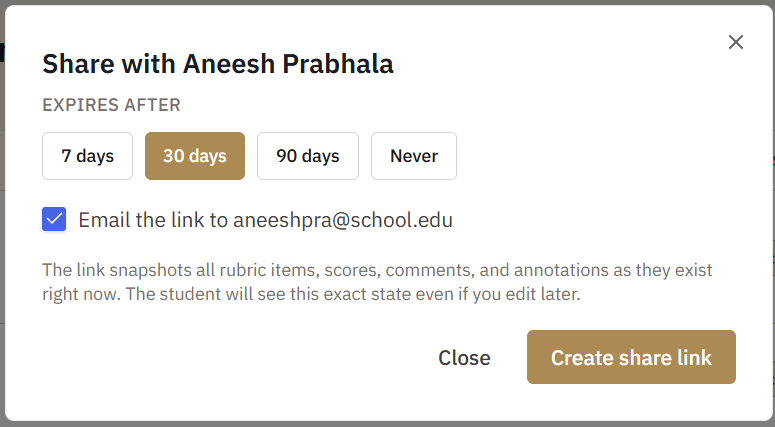
If that student has an email address on their roster entry, InteGrade emails it to them as soon as the link is made. If they do not, the checkbox is unavailable and you get the link to send however you like.
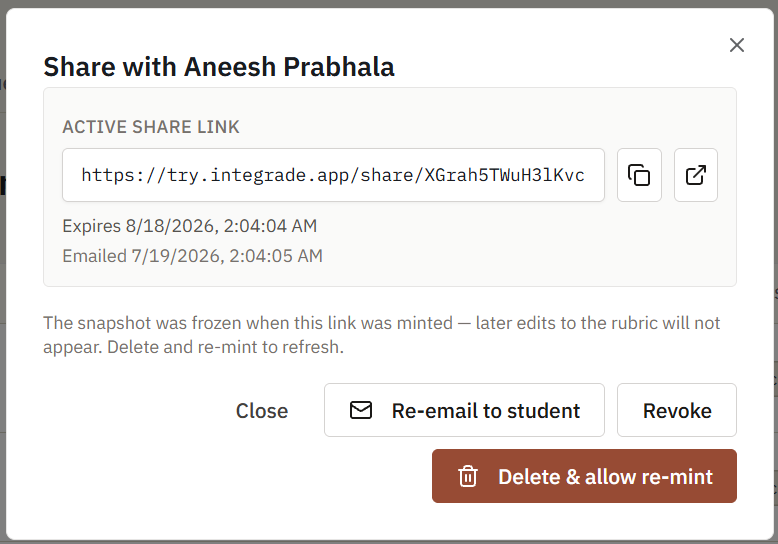
Once the link exists, the dialog shows it back to you with a button to copy it, the date it expires, and the date it was emailed.
The email is short: it says their feedback for the assignment is ready, and gives them a button that opens it. Replies go to your email address, not to a no-reply void.
The link captures the work as it stands the moment you create it: the rubric items you applied, the score, your comments, and your annotations. If you regrade afterwards, the student still sees the old version, because their link points at that snapshot rather than at your live grading. Delete the link and create a fresh one to give them the corrected work.
Sharing with the whole class
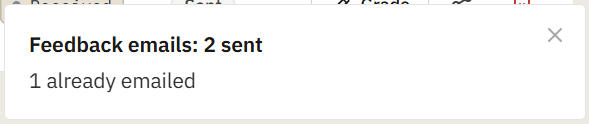
You can also share an entire assignment at once. InteGrade creates links for everyone who does not have one yet, gives each new link 30 days, and emails every student who has an address on file. When it finishes you get a summary of how each student was handled.
Four behaviors worth knowing:
- Students with no email on file are reported back to you, not silently dropped, so you can hand out those few links yourself.
- Already-shared students are not re-emailed by a bulk send. It will not spam a student who got their link last week.
- Revoked links are not quietly re-created. If you deliberately cut off a student's access, a later bulk send leaves them cut off rather than resurrecting the link behind your back.
- Expired links are skipped too, for the same reason. Delete and re-create the link for that student if you want them back in.
If sending stops partway
There is a daily ceiling on feedback emails, and on a busy day it can be reached before your whole class is sent. When that happens InteGrade stops sending and tells you how many students were blocked by the limit.
Students who were emailed before the ceiling was reached keep their emails. The ones after it do not, so a class can end up partly sent. Nothing is lost either way: every link was still created. Copy the remaining ones and send them yourself, or run the bulk send again tomorrow.
Sharing a single link at that point tells you the daily email limit was reached and asks you to copy the link and share it manually. The link is still made; only the email is refused.
Taking a link back
You choose the lifespan when you create a link: 7, 30, or 90 days, or no expiry at all. Thirty days is the default, and it is what bulk sharing uses.
You can also revoke a link at any time, which stops it working immediately. Do this if you sent the wrong link to the wrong student, or if you need to regrade before anyone reads it.
One thing to know before you revoke: a student who opens a revoked or expired link sees a plain page not found, with nothing explaining why. If you cut off a link that a student already has, tell them directly rather than leaving them to work it out from a dead page.
What students cannot do
On the free plan, students have no accounts. They can read what you share and nothing else: they cannot submit their own work. That is a full version feature.