Creating an assignment
The template PDF, plus two optional uploads that save you time later.
An assignment starts with one required file and up to two optional ones.
The template PDF (required)
The template is the blank assignment your students filled out: the exam, lab, or problem set as distributed. InteGrade uses it as the reference layout for drawing question regions, so every student's page 3 lines up with the template's page 3.
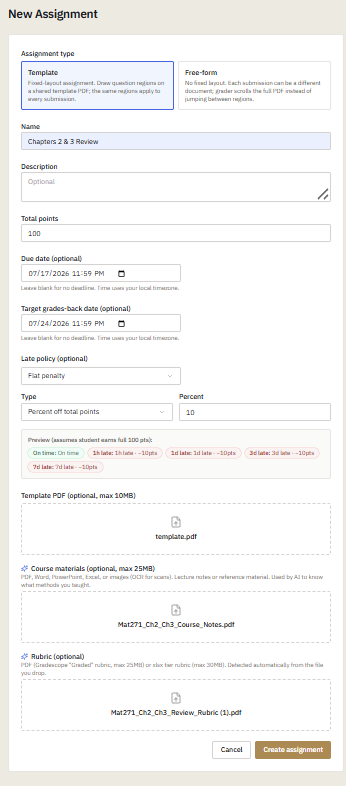
Optional: an existing rubric PDF
If you are migrating from Gradescope or have a rubric saved as a PDF, attach it here. InteGrade reads it and reconstructs the entire outline automatically: questions, subquestions, point values, and rubric items, including the math typeset in LaTeX. Details in Importing an existing rubric.
Optional: course materials
Attach your lecture notes or course pack if you plan to use course method analysis, which flags solutions that use techniques your course never covered. The materials tell InteGrade what you actually taught. Details in Uploading course materials.
After creating
You land in the outline editor. If you imported a rubric, the outline arrives pre-populated and your remaining work is drawing regions and reviewing point values. Otherwise, start with Questions and subquestions.
Keep file sizes reasonable. Very large scanned PDFs upload slowly and rarely improve results. If a rubric PDF fails to import, try a smaller export of the same rubric.