Submissions
Bulk scans and automatic matching
Scan the whole pile once. InteGrade sorts it to your roster.
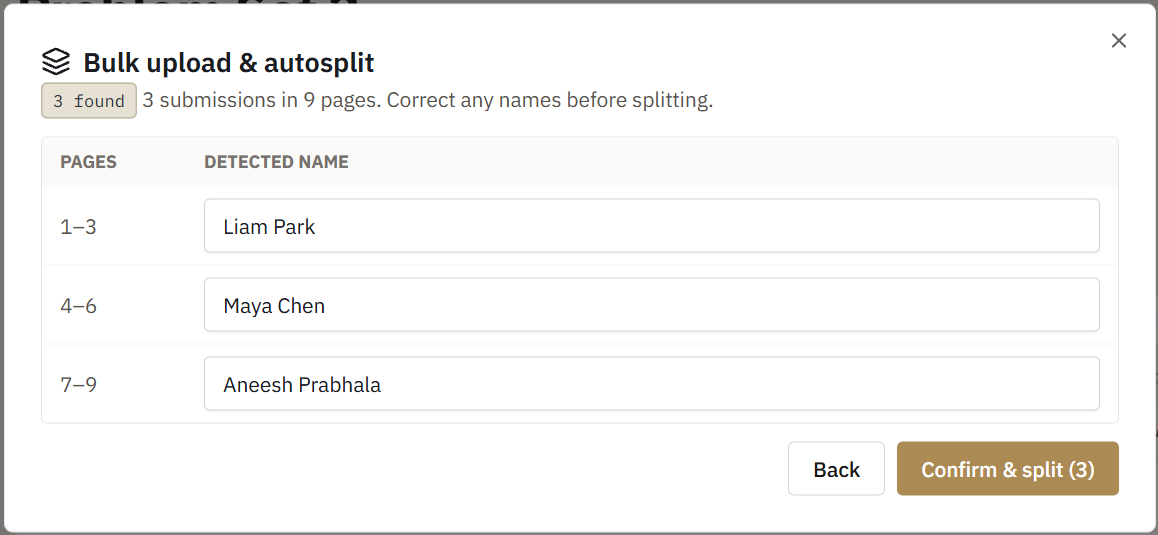
The fastest way to handle a paper exam: collect the stack, run it through a scanner, upload one PDF, and let InteGrade split it into per-student submissions matched to your roster.
Before you scan
- Make sure the assignment's name region is drawn on the template, around wherever students write their name.
- Scan the stack in a consistent page order (every exam complete, first page first). Standard copier scan-to-PDF settings are fine.
What happens on upload
- InteGrade splits the stack into submissions using the template's page count.
- For each submission, it reads the handwriting inside the name region.
- The read name is compared against your roster, tolerantly. "J. Pak" matches Jordan Pak; misspellings, initials, and rough handwriting are all handled.
- Confident matches link automatically. Anything uncertain is queued for your review rather than guessed.
Privacy by design
Name matching runs entirely in your browser. The page images containing student names are read locally on your machine, matched against the roster locally, and the identifying content never leaves your device or touches any outside service.
Accuracy expectations
Most pages match automatically on a typical scan. InteGrade is deliberately conservative: when handwriting is genuinely ambiguous, it asks you instead of silently mislinking work to the wrong student. Confirming the leftover handful takes a few seconds each.