Visual processing
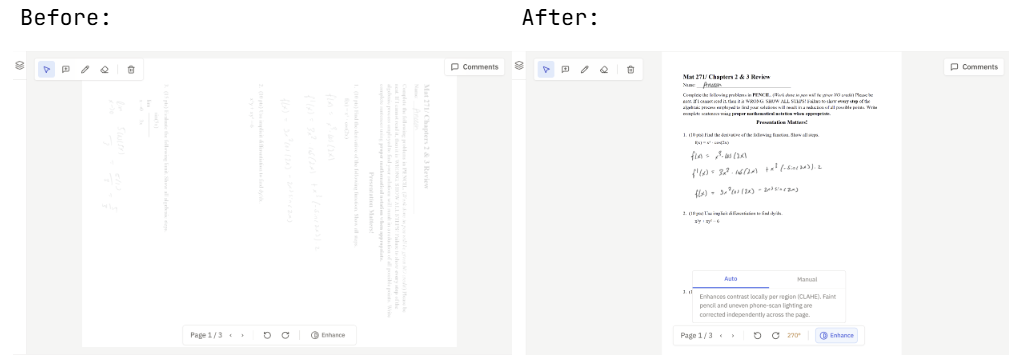
Sideways pages and faint pencil, fixed in the grading view.
Submissions photographed on phones or rushed through a scanner arrive imperfect. The grading view gives you two controls that make a page readable without asking the student to send it again.
Rotation
If a page arrives sideways or upside down, rotate it from the grading view toolbar. The rotation stays with that physical page, so it holds as you move through the submission and it follows the page if you reorder the submission later.
Enhance
Enhance lifts faint pencil and evens out uneven phone-scan lighting. Open it from the grading view toolbar and pick a mode:
- Auto corrects contrast locally, region by region, so a page lit brightly on one side and dimly on the other comes out even across the whole sheet.
- Manual gives you brightness, contrast, and saturation sliders when you would rather set it yourself.
Enhance changes how the page looks while you grade. It does not alter the file the student submitted, and it does not change what the student sees.
When something is still unreadable
Processing can rescue a lot, but not a photo taken in the dark of a page in motion. If a submission is genuinely illegible, the fix is a better capture: ask the student to rescan or rephotograph, then replace the submission.