The grading view
One question at a time, across every student.
InteGrade is built around question-by-question grading: you grade Q3 for everyone, then Q4 for everyone. Grading the same problem in a row keeps your standard consistent and is dramatically faster than flipping submission to submission.
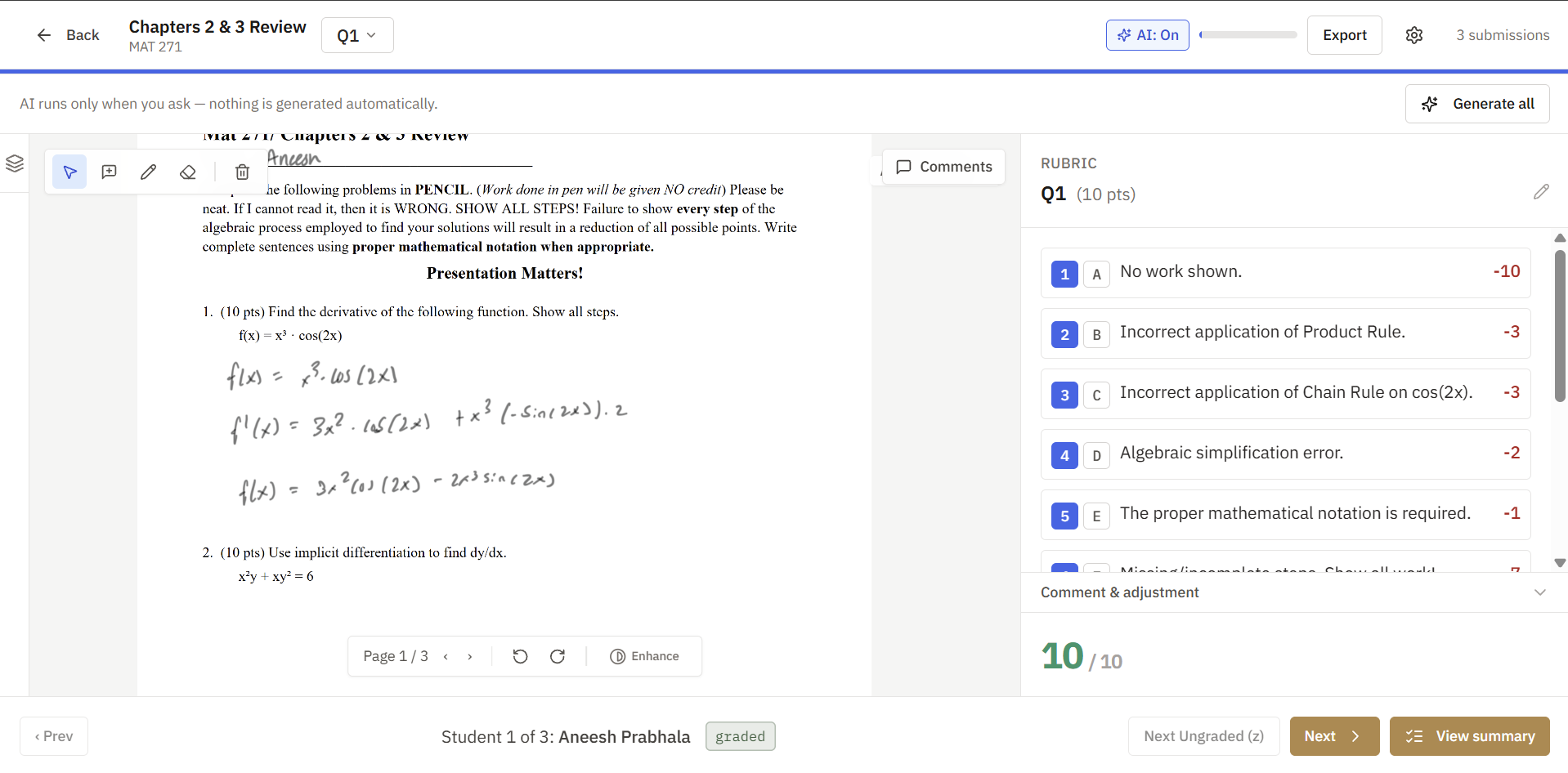
The layout
- Center: the student's work, auto-zoomed to the current question's region.
- Side panel: the rubric for the current question. Click items to apply them; the score updates live.
- Top bar: which question and which submission you are on, plus overall progress.
- Thumbnail rail: a collapsible strip of page thumbnails for jumping around or reordering pages.
The core loop
- Look at the work.
- Apply rubric items that fit. Create a new item on the spot if you hit a new mistake.
- Add a comment if the rubric alone does not say enough.
- Advance to the next submission. Repeat until the question is done, then move to the next question.
Navigation runs on keyboard shortcuts, and "next ungraded" jumps skip anything already done, so resuming a half-finished session drops you exactly where you left off.
Multi-part questions
Subparts appear in document order, the same order they sit on the page, and scoring across parts follows the question's scoring mode.
Everything saves as you go
There is no save button. Every applied item and comment saves the moment you act, on your device immediately and to the server moments later. The sync status indicator confirms it.